Daily: do nothing, but know the normal LED blink (once every 40 seconds).
Monthly: press TEST on each detector and check the chamber for dust.
Battery: replace it when the low-battery beep appears, not on a fixed schedule.
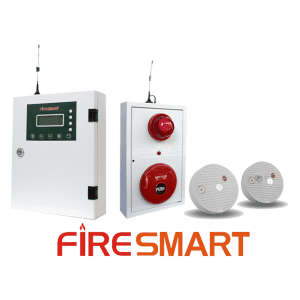
Every FireSmart WSD-1/WHD-1 detector has its own status LED. So does the FSMBL-001 sounder-strobe-call-point unit. A wired system shows only a line item on the panel.
Your team can learn the blink patterns. It then catches a dirty smoke chamber or a low battery weeks early.
That prevents a false alarm or a missed one. This guide lists the daily, monthly and annual tasks. It also explains each LED pattern.
Daily — nothing to do, but know what “normal” looks like
In normal conditions, each WSD-1/WHD-1 LED blinks once every 40 seconds. This means the device has power, has checked in and has nothing to report.
Watch only for a change in this pattern. Each detector calibrates itself to the air quality and temperature of its mounting location at first power-up. It then re-calibrates about every 10 hours.
During this time the LED blinks once per second. This is normal, not a fault.
Monthly — the functional test
Press the TEST button on each detector while it is in its normal state. The device sounds its alarm and flashes for about 10 seconds.
It then restarts by itself. This confirms the sounder, the LED and the device logic still work. You do not need real smoke or heat.
On a panel-connected system, the test also confirms the panel shows the correct device location. On a standalone or FCOM-linked group, it confirms the other devices still respond to the test signal.
TIP Check the smoke chamber and heat sensor for dust or blockage at the same visit. A dirty smoke chamber is the most common cause of a false alarm or a stuck fault. It is easier to catch during a scheduled check than after a callout.
Battery — act on the warning, not on a fixed calendar
FireSmart wireless detectors have no fixed replacement schedule. Each device reports its own battery status continuously. It gives an early low-battery warning.
The normal 40-second blink is then joined by an audible beep. The panel (or the FireSmart app, on an FCOM-linked system) shows the same warning for that device location. Replace the battery as soon as this pattern appears.
A battery with a low warning still has working reserve. The early warning lets you replace it during a normal site visit, not an unplanned one.
How the heat-detection logic works (and why it matters for placement)
FireSmart heat detectors (WHD-1, and the heat-sensing half of the combined WSD/WHD unit) run two detection methods in parallel. This explains where to mount a device and where not to.
Fixed threshold (~60°C): the device measures temperature every 8 seconds. When a reading passes about 60°C, it measures once per second. It confirms with two more readings before it raises an alarm. This takes typically 2–3 seconds, and no more than about 10 seconds. This method catches a slow, smouldering fire.
Rate-of-rise: the device tracks a slowly adapting baseline temperature for its own location. The baseline takes 8–9 minutes to follow a new level. Weather or air-conditioning drift does not trigger an alarm. A fast spike, as a fire produces, outruns the baseline. An alarm needs all three conditions at once: the temperature is at or above 40°C; it is at least 20°C above the baseline; and two consecutive readings (about 16 seconds) agree.
The baseline starts again from zero at every power-up. A device in an already-warm space does not give an immediate false alarm. A real temperature spike after that still triggers it.
NOTE Do not mount a heat detector directly above a stove, oven, hot-air vent or kiln door. The baseline there is already close to the alarm threshold. The temperature sensor sits outside the housing. Never paint, tape or wrap it.
Annual — a full-system review, not just device testing
Look at the system as a whole once a year. Do these checks:
Confirm the FCOM transmission path still reaches the monitoring point or fire department line.
Review the panel event log for repeated faults that monthly tests do not show.
Re-check that each detector location is still suitable. A re-fitted space, new racking or new equipment may need detectors added, moved or changed from smoke to heat type.
Confirm that no two devices share an address.
Confirm the location names on the panel still match how the building is used.
The FSMBL-001 sounder-strobe-call-point unit
In normal conditions, the AC and DC power indicators show steady green. The sounder is silent.
On any alarm in the connected system, the sounder and strobe start at once. They do not wait for a command from the panel. The relay output can drive external equipment, such as a rotating beacon or a fan shutdown. Pressing the manual call point button raises the alarm across the whole connected system immediately.
Indicator
Meaning
Action
DC amber
Backup power source is low
Replace the backup power source
AC amber
Mains power is lost
Check the incoming supply
Quick reference — what the LED pattern means
Pattern
Meaning
Action
Blink once every 40 seconds
Normal
None
Blink + beep every 40 seconds
Low battery
Replace battery
Two blinks every 40 seconds
Sensor fault (dirty smoke chamber, or a disconnected or damaged heat sensor)
Clean the smoke chamber, or reconnect or replace the heat sensor and re-power
Blink once per second
Self-calibrating
Wait — keep smoke and airflow away from the device
Steady light, no sound
Calibration failed — usually a very dirty smoke chamber
Clean the chamber and re-seat the battery in clean air; replace the detector if it still shows steady red
Fast blink + sounding
This device has detected an alarm condition
Check that specific area immediately
Blink + intermittent sound
Sounding in response to another device’s alarm
Check the panel or app for the actual alarm location
What to remember
Do not replace a battery or power-cycle a device while an alarm is active. This can silence the whole connected group for several seconds.
Never give two devices the same address in one system. The panel will show the wrong location for an alarm.
Run the monthly TEST on every device. It is the only way to confirm a device works without a real smoke or heat event.
Replace a battery as soon as the low-battery pattern appears.
Clean smoke chambers periodically. A two-blink pattern is the direct symptom of a dirty chamber.
NOTE Pressing TEST on an individual detector mutes it for about 90 seconds only. This is not a repair. The alarm resumes if the condition is still present.
1️⃣ How often should a FireSmart wireless detector be tested?
Once a month. Press the TEST button on each detector while it is in its normal state. It sounds its alarm and flashes for about 10 seconds, then restarts automatically. This confirms the sounder, LED and device logic still work.
2️⃣ What does it mean if a detector’s LED blinks twice every 40 seconds?
A sensor fault — usually a dirty smoke chamber, or a disconnected or damaged heat sensor. Clean the smoke chamber, or reconnect or replace the heat sensor and re-power the device.
3️⃣ Should the battery be replaced on a fixed schedule?
No. FireSmart wireless detectors have no fixed replacement schedule. Each device reports its own battery status continuously and gives an early low-battery warning: the normal 40-second blink is joined by an audible beep. Replace the battery as soon as that pattern appears.
4️⃣ Can a heat detector be mounted directly above a stove or oven?
No. The baseline temperature the device tracks for rate-of-rise detection is already close to the alarm threshold there. Do not mount it directly above a stove, oven, hot-air vent or kiln door.
5️⃣ Does silencing a detector with its TEST button stop an active alarm?
Only briefly. Pressing TEST on an individual detector mutes it for about 90 seconds only. It is not a repair. The alarm resumes if the condition that triggered it is still present.
🛠️ Need a maintenance programme for a specific site?
Berbeda cara alarm kebakaran tradisional, sistem alarm kebakaran nirkabel adalah solusi baru yang memanfaatkan teknologi nirkabel untuk mendeteksi dan memberikan peringatan tentang risiko kebakaran. FireSmart adalah perusahaan yang memproduksi perangkat alarm kebakaran di Vietnam. Kami memproduksi sistem alarm kebakaran nirkabel, termasuk panel kontrol pusat, detektor asap, detektor panas, sirine alarm, dan tombol tekan alarm darurat….
30-SECOND SUMMARY Class A (Style 6) wires the circuit as a loop that returns to the panel. One break does not cut off any device. Class B (Style 4) is a single run that ends in an EOL resistor. Devices past a break lose contact with the panel. The class applies per circuit: detection circuits…
1. Understanding Fire Alarm System Components In the realm of fire safety, the fire alarm system stands as a pivotal element, ensuring the safety and protection of both lives and property. A fire alarm system is an amalgamation of various components, each playing a crucial role in detecting and alerting occupants in the event of…
30-SECOND SUMMARY Design in four steps: zoning, device schedule, calculations, approval package. Reviewers check two calculations: voltage drop and battery standby capacity. Submit all five documents together, with the same zone numbers in each. Outside the United States, many specifiers still use NFPA 72, the U.S. National Fire Alarm and Signaling Code. They use it…
30-SECOND SUMMARY NFPA 72-2025 makes cybersecurity a mandatory chapter and adds two new detector types. Above a 40-foot ceiling, detector spacing now needs a performance-based design. Trouble signals for a failed communication pathway are due within 200 seconds. NFPA 72 is the U.S. National Fire Alarm and Signaling Code. It is revised every three years….